 clipoven
You’re standing in front of the bathroom mirror, pulling your hair down past your shoulders with your fingers and wondering if it would suit you that way. Maybe you’re between cuts, saving photos of styles you like, and asking what will I look like with long hair before you commit to months of growing it out. A preview can help you shortlist lengths, but it can’t promise the result. I recommend treating every preview as a dated style hypothesis. Pair the image you like with a realistic grow out timeline and a quarterly photo check, and you’ll know whether you’re moving toward that look or chasing a filter.
Table of Contents
- Long-Hair Preview Methods Compared Side by Side
- Lighting and Camera Angles That Keep Previews Honest
- How to Run a Long-Hair Preview Step by Step
- Reading Face Width, Length and Volume in the Results
- How Long Real Growth Takes Before the Look Is Real
- Confirm the Look With a Stylist Before Cutting
Long-Hair Preview Methods Compared Side by Side
No single tool predicts your exact result, so choose the method that matches the decision in front of you. If you’re deciding between collarbone and mid-back, you need a different test than if you’re deciding between straight and wavy, or between your current color and something lighter. The fastest option is rarely the most honest one, and the most realistic option usually takes an appointment.
Use the comparison to pick a primary method for shortlisting, then add one real world check before you change your cut.
Long-hair preview methods by goal, realism and effort
| Method | Best for | Realism of length | Main limitation | Effort |
|---|---|---|---|---|
| AR try-on app on a live camera | Quick first look at length and color | Medium | Often smooths skin and misplaces hair edges | Low |
| AI photo editor on a still image | Comparing several lengths in one session | Medium to high on clean photos | Can alter face shape; hair texture often generic | Low to medium |
| Mobile beauty filter | Fun mood check with fixed length options | Low | Built for entertainment, heavy smoothing | Very low |
| Manual photo mockup in a desktop editor | Precise control of length and texture | High if done carefully | Time-consuming; hard to match lighting | High |
| Stylist consultation with clip-in extensions | Real length on your own head | High | Needs an appointment and may cost money | Medium |
What Each Method Actually Tells You
AR try-on apps are useful for a first reaction. You open the camera, move your head, and see whether longer hair overwhelms your face or sits comfortably against your neck. The trade off is edge accuracy. Hairlines drift, flyaways disappear, and skin smoothing can make the whole style look softer than your real hair will.
AI photo editors work better for side by side comparison because you can keep one baseline photo and generate shoulder, upper back, and mid-back versions from it. That consistency matters. The weakness is subtle face reshaping. If your jaw looks slimmer or your eyes look larger in the preview, you’re judging a different face, not longer hair.
Mobile beauty filters sit at the entertainment end. They’re fine for asking whether you enjoy the general mood of long hair, but fixed templates rarely respect your parting, density, or natural wave.
Where Control Improves and Effort Rises
A manual mockup in a desktop editor such as Photoshop or Affinity Photo gives you the most digital control. You can place the ends exactly at the collarbone, keep your own color, and copy texture from a photo of your hair. It’s slow work, and mismatched light gives it away quickly. Hair that glows while your face sits in shadow won’t tell you anything reliable.
Clip-in extensions at a consultation answer questions software can’t. You feel the weight, see how length moves when you turn, and notice whether extra hair catches on collars or bags. It costs time and sometimes money, but it’s the closest low commitment test.
Practical pairing: Shortlist with an AI photo editor, then verify your top two lengths with clip-ins or a stylist’s eye before you commit to growing or cutting.
That two step approach stops a flattering filter from making a long term decision for you. Use software for range, use real hair for truth.
Lighting and Camera Angles That Keep Previews Honest
The most common phone preview mistake is shooting under a bathroom ceiling light and trusting what you see. Overhead light drops shadows under your chin, flattens the top of your head, and makes ends look thinner than they are. The same hair by a window can look fuller, shinier, and longer. If you don’t fix the light first, you’ll compare lighting setups instead of hairstyles.
Start with soft, even light from the front, ideally daylight from a window facing you. Stand about an arm’s length from it so the light wraps your face without blowing out your forehead. Avoid standing with the window behind you. Backlight darkens hair edges, hides your face, and makes any generated length read as a solid shape rather than individual movement.
Camera Position Changes the Length Relationship
Hold the camera at eye level and far enough away that your shoulders fit comfortably in frame. Shooting from above shortens the neck and makes hair appear to reach landmarks sooner. Shooting from below lengthens the jaw and chin, which changes how face framing pieces look. Neither angle matches how people usually see you.
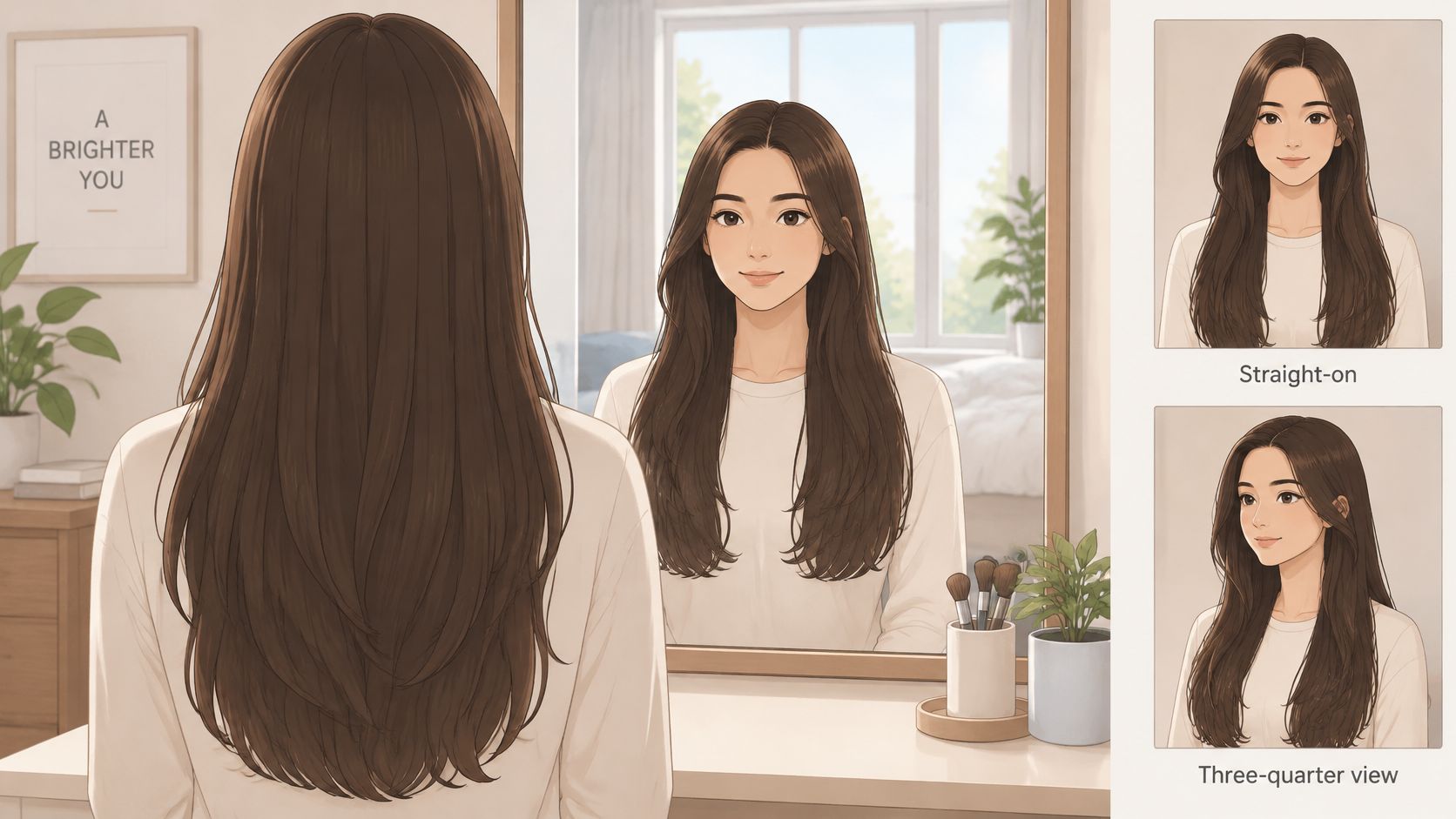
Take a front view and a three-quarter view. The front shot shows symmetry, parting, and width beside the cheeks. The three-quarter shot shows depth, how hair falls over one shoulder, and whether length pulls attention down the neck. Long hair lives in three dimensions, so a flat front selfie can’t judge it alone.
Use the standard 1x lens, not the wide setting. Wide lenses stretch the edges of the frame and can widen the face, especially when the phone is close. If you need more distance, prop the phone on a shelf and use a timer.
Small Settings That Distort the Result
- Turn off beauty smoothing: It softens the hairline and jaw, exactly where you need clear edges.
- Turn off HDR if your phone allows it: It can shift color and lift shadows unevenly between shots.
- Use a plain wall: Busy backgrounds make generated hair edges harder to spot and judge.
- Keep the same neckline: A crew neck, open collar, and strapless top place the ends against different landmarks.
Fix this setup once and reuse it every time. Consistency won’t make a weak preview perfect, but inconsistency guarantees you’ll misread even a good one.
How to Run a Long-Hair Preview Step by Step
Order matters more than the app you pick. If you generate lengths from three different selfies, in three rooms, with three partings, you haven’t tested length. You’ve tested everything at once. A controlled comparison keeps your face, light, and camera steady so the only meaningful change is the hair itself.
That approach matches facial image research on hairstyle impressions, which found that perceived impressions depend jointly on facial shape and hairstyle. In practice, that means you shouldn’t judge length in isolation from the face it frames.
Build the Baseline First
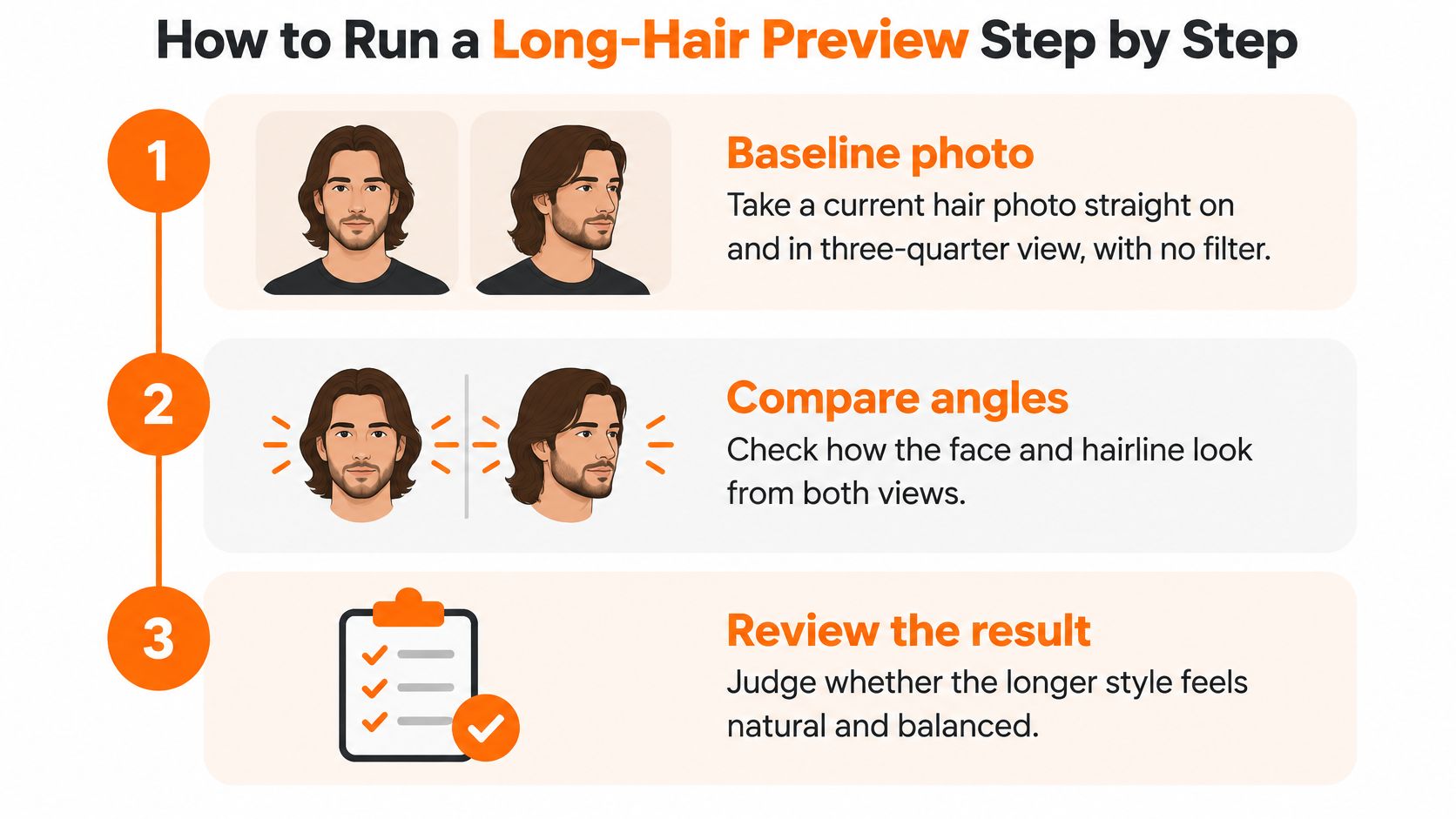
1. Take your baseline photos. Photograph your current hair straight on and in three-quarter view, with no filter and your usual parting. Pull your hair into its natural fall rather than styling it into something you wouldn’t wear daily. These photos are your control images, so don’t retake them just because you dislike one detail.
2. Lock the variables. Keep lighting, camera distance, background, top, makeup level, and hair color the same across every version. If you also want to test color, do that later as a separate round. Changing color and length together makes it impossible to know which one changed your reaction.
Generate a Range, Not a Single Answer
3. Create at least three lengths. Generate hair ending at the shoulders, the upper back, and the mid-back. Those landmarks are spaced far enough apart to show real differences in silhouette and neck coverage. Tiny increments tend to produce images that look alike and waste your attention.
4. Add texture versions for each length. Produce a straight version and a wavy or layered version at every length. Straight hair displays measured length most clearly. Wavy and curly hair occupy more visual volume and can appear shorter at the same measurement because the hair travels in curves. If you know your natural texture, weight that version more heavily than a polished straight render you would need heat styling to copy.
5. Save everything at the same crop and size. Label each file clearly, for example shoulder straight, shoulder wavy, upper back layered. Consistent cropping prevents one image from winning because your face is larger in frame.
Judge the Set Like a Stylist Would
6. Compare side by side on a larger screen if you can. Look first at the overall silhouette, not individual strands. Then check cheek and jaw framing, width beside the face, and where the ends land against your neck, collarbones, and shoulders. Ask whether the hair supports your features or sits like a separate shape around them.
Watch for software tricks while you compare. Smoothed skin, narrowed cheeks, lifted eyes, or a changed chin mean the tool has altered the canvas. Discard those images even if you like them. A preview that changes your face geometry can’t answer what will I look like with long hair, because it isn’t showing your face.
Treat face shape rules as starting points for observation, not verdicts. A preview can show that one length adds width beside your jaw, but it can’t declare that length wrong for every similar face.
7. Shortlist two lengths and stop generating. Endless variations blur your judgment. Save your two strongest options beside the baseline, note the date and the target landmark for each, and take them to a stylist. At that point the preview becomes a useful conversation about texture, density, layering, and timing rather than a promise printed from an app.
Reading Face Width, Length and Volume in the Results
Long hair isn’t one look. A one length cut to the upper back can draw a clean vertical line and soften facial edges, while shoulder length hair with volume at cheek level can make the same face look broader. The difference isn’t only centimeters. It’s where the hair places width, weight, and movement.
When you review previews, separate three questions. Where do the ends fall against the neck and shoulders? How much hair sits beside the cheeks and jaw? Do layers or face framing pieces push outward, or do they cut into the shape and create space?
How Each Length Tends to Change the Face and Neck
| Length | Typical visual effect | Texture to test | Watch for |
|---|---|---|---|
| Shoulder length | Frames the jaw; volume can widen the cheek area | Layered or wavy for movement | Bulk at cheek level makes the face look broader |
| Collarbone length | Lengthens the neck line and balances a strong jaw | Straight or soft waves | Thin ends can look sparse |
| Upper back | Adds a vertical line and weight at the shoulders | Straight or loose waves | Heavy hair can pull the face down |
| Mid-back | Strongest length statement with the most visible movement | Straight, or layered waves to reduce heaviness | Curl shrinkage can make the length look shorter than the photo |
Use the table as a reading guide, not a ranking. Shoulder length often creates the widest point near the jaw because the ends turn, bounce, and collect volume there. Collarbone length moves that activity lower, which can expose more neck and settle a strong jawline. Upper back and mid-back lengths read more vertical, but thick one length hair can hang heavily and drag attention downward if there’s no layering to release weight.
A Quick Way to Test Silhouette
Place your shortlisted images beside each other at the same size. Cover the lower half of each photo with your hand and judge only the face and the hair around it. Then uncover the ends. If a style only works when you see the dramatic length at the bottom, but the framing around your cheeks feels crowded, the everyday result may disappoint you. People notice the frame around your face first.
Texture changes the reading again. Waves and curls build width earlier and shrink visible length, so a mid-back measurement may present as upper back in the mirror. Straight hair shows every centimeter but also shows thin or uneven ends more clearly.
Perception research gives context, not instructions. In a Seoul impression formation study involving 343 women, long hair scored relatively highly on attractiveness and femininity, while short hair received the highest perception of sociability. The same work found interactions among length, wave pattern, and color, so your texture and color can shift the impression as much as length does. Keep the versions that balance width, neck line, and movement on your own photos, and let general perception stay in the background.
How Long Real Growth Takes Before the Look Is Real
A preview arrives in seconds. Real hair doesn’t. Before you commit to a target, convert the picture into months and decide whether you’re willing to live through the stages between now and that endpoint.
The Dyson guide to how fast hair grows puts scalp hair growth at about 0.5 inches (1.25 cm) per month, or approximately 6 inches (15 cm) per year. Use that as your working average, not a guarantee.
Do the Measurement Before You Set a Date
Measure from your current shortest relevant point to where you want the ends to land. If your shortest layers sit at the jaw and you want them at the collarbone, measure that gap rather than using your longest back section. Divide the gap in centimeters by 1.25 to estimate months.
Say you need 15 cm of additional length. At the average rate, that’s about 12 months before trims, breakage, shrinkage, or uneven growth enter the calculation. Write that date beside your preview. A target without a date invites frustration at month three, when the shape still looks nothing like the final image.
Approximate grow-out time by length gap
| Length to gain | Months at average growth | Quarterly checkpoints |
|---|---|---|
| 5 cm (about 2 inches) | 4 | 1 to 2 |
| 10 cm (about 4 inches) | 8 | 2 to 3 |
| 15 cm (about 6 inches) | 12 | 4 |
| 20 cm (about 8 inches) | 16 | 5 to 6 |
| 30 cm (about 12 inches) | 24 | 8 |
Individual pace can sit far from the average. The ATSDR hair analysis guidance reports individual rates from approximately 0.6 to 3.36 centimeters per month. If your past grow out suggests you’re near the slower end, plan cautiously and judge progress from your own measurements after the first two checkpoints.
Use Quarterly Checkpoints Instead of Daily Mirror Checks
Photograph your hair every three months from the front and side, in the same light and top you used for the baseline. Record front and side lengths against body landmarks, such as chin, collarbone, or shoulder blade. Then compare the new photos with your dated hypothesis and ask what has changed.
Expect awkward stages. Ends may look thinner while shorter layers catch up, one side may flip outward at the shoulders, and hair can feel bulky before it gains enough length to lie down. Those stages don’t automatically mean the target is wrong. They mean the shape needs patience, light reshaping, or a styling adjustment, not necessarily a reset cut that removes months of progress.
Retained length matters as much as growth. Trims, breakage, and curl shrinkage reduce what you keep, so gentle handling when wet and sensible heat habits protect the timeline. Shedding of roughly 50 to 100 hairs per day is commonly considered normal, but persistent thinning, patchiness, or scalp symptoms deserve professional evaluation.
Confirm the Look With a Stylist Before Cutting
Treat your favorite preview as a style hypothesis, not a biological forecast. That single distinction protects you from expecting an app to know things it can’t know about your hair.
Your eventual density, curl pattern, shrinkage, breakage, and maximum attainable length will shape the result. A review in the British Journal of Dermatology on scalp hair length explains that human scalp hair length depends primarily on how long follicles remain in the anagen growth phase and secondarily on the fibre’s growth rate. Two people can receive the same polished mid-back preview and arrive at visibly different hair because their follicles, texture, and retention aren’t the same.
Turn the Preview Into Salon Instructions
Bring evidence, not just inspiration. A stylist can do far more with your baseline, two shortlisted lengths, and a target date than with a folder of celebrity photos on different heads.
- Save your two best previews beside the baseline photo. Keep the same crop so the stylist can see exactly where each target ends.
- Ask for a texture check on your real hair. Discuss density at the ends, natural wave, shrinkage, and whether layers would release weight or expose thinness.
- Translate landmarks into cut language. Replace vague requests with instructions such as ends at the collarbone, face framing starting below the cheekbone, and minimal width at jaw level.
- Agree on checkpoint dates. Book reviews around your quarterly photos so reshaping supports the grow out instead of restarting it.
- Choose a full grow out or a staged transition. A long bob can act as a deliberate intermediate style while shorter layers catch up, which beats enduring an accidental in between shape for months.
Ask direct questions during the consultation. How many months from my shortest layer to this landmark? Will my ends look thinner before they look fuller? Which layers should we preserve, and which ones will create bulk in the wrong place? Can my texture present at this visible length without daily heat styling?
A good consultation may talk you out of your longest option and into a length your hair can wear well sooner. That’s not a failed preview. That’s the preview doing its job.
Set Expectations for the Transition
Early stages can look uneven, bulky, or finer at the ends, even when the plan is sound. Decide in advance how you’ll handle those months. You might part your hair differently as weight shifts, add soft waves to blend uneven layers, or use clip-ins for events while your own length develops. Planning for the middle prevents a frustrated cut at the exact point where progress is hardest to see.
I would keep the preview visible, but I’d let measurements outrank it. If your quarterly photos show steady retained length and the silhouette is moving toward your shortlisted shape, stay the course. If breakage keeps erasing gains or the added width still crowds your face, revise the hypothesis with your stylist. The preview tells you where to aim. Your hair, timeline, and stylist’s judgment decide the version that works in real life.
If you record your grow out journey or stylist consultations on video, clipoven can turn that horizontal footage into polished vertical shorts for TikTok and YouTube Shorts with AI assisted cuts, captions, and reframing. Visit clipoven to turn your quarterly progress checks into clear, shareable updates without spending hours reformatting every clip by hand.