 clipoven
TikTok’s average engagement rate was about 2.60%, compared with about 0.30% for YouTube Shorts, in a benchmark covering 69 million short-form videos. That gap is striking, but it doesn’t establish a winner: creators need to compare what each platform counts, which clips qualify for payment, and what a view is worth beyond its headline number. The practical question in YouTube Shorts vs TikTok is what each feed can do with the same source recording, once you adapt the edit to suit its audience and revenue path, according to the cross-platform engagement benchmark.
Table of Contents
- Headline Numbers Side by Side
- Audience Reach and Measurement Differences
- How Each Feed Decides What to Push
- What Each Platform Pays Creators
- Video Specs for Each Platform
- Repurposing One Clip for Both Platforms
- Which Platform Fits Your Situation
- Run a Two-Platform Test Before You Commit
Headline Numbers Side by Side
| Criterion | YouTube Shorts | TikTok |
|---|---|---|
| Maximum length | Up to 3 minutes | Up to 10 minutes |
| Reported audience scale | Over 2 billion signed-in monthly users watching Shorts (2023) | Over 1 billion monthly users (September 2021) |
| Daily views | Over 70 billion (2023) | Not reported in the figures used here |
| Average engagement rate | About 0.30% | About 2.60% |
| Comments per post | About 10 | About 50 |
The engagement and comments figures come from the same broad benchmark, which analyzed 69 million short-form videos published from January 2025 through July 2026. YouTube’s audience and view totals, and TikTok’s monthly-user figure, come from separate platform-reported measurements, with different dates and definitions. The table is a directional comparison, not a controlled test of identical accounts or clips.
One row matters more than the others depending on what you’re trying to accomplish. For awareness, look at the audience and distribution available to your clip, then assess its views using the platform’s own definition. For community building, engagement can help, but only after you know what it’s measured against. If the clip is meant to start a conversation, comments per post may be the most relevant signal.
Don’t treat the rates as a forecast for your channel. The benchmark combines different account sizes and industries, and engagement-rate denominators can differ. The TikTok video length guide can help you think through format choices, but a clip’s ideal length still depends on its content and purpose.
Audience Reach and Measurement Differences
Shorts sits inside YouTube’s wider ecosystem. A vertical clip can appear alongside channel pages, search results, and long-form videos, so it can help introduce a viewer to more of a creator’s work. TikTok is built around its own short-video experience, where the feed, sounds, and trends shape discovery. That difference matters when you turn one horizontal recording into two vertical edits: the same moment can serve as an entry point to a YouTube library or as a self-contained TikTok post.
The audience figures show the potential scale, but they aren’t a like-for-like contest. YouTube reported more than 2 billion signed-in users watching Shorts monthly in 2023, and more than 70 billion daily Shorts views that year. TikTok reported more than 1 billion monthly users globally by September 2021. YouTube’s reported milestones show Shorts becoming a large distribution layer within its existing platform, not a standalone network; the history of YouTube Shorts traces its expansion from an initial beta to broader availability. A comparison of platform scale measures makes the key distinction clear: monthly users count people, while daily views count plays.
That difference changes how you interpret performance. Fifty thousand Shorts views and fifty thousand TikTok views don’t necessarily represent the same number of people reached, or equivalent attention. YouTube changed its Shorts view-counting method on March 31, 2025: a view now counts each time a Short starts or replays, without a minimum watch time. The older measure was renamed engaged views, so a before-and-after comparison needs to account for which metric is being used.
Before comparing an audience or campaign figure, check three things:
- The metric definition: Is it a view, an engaged view, or a monthly user?
- The unit: Does it count people or video plays?
- The comparison window: Did a measurement change occur during the period?
How Each Feed Decides What to Push
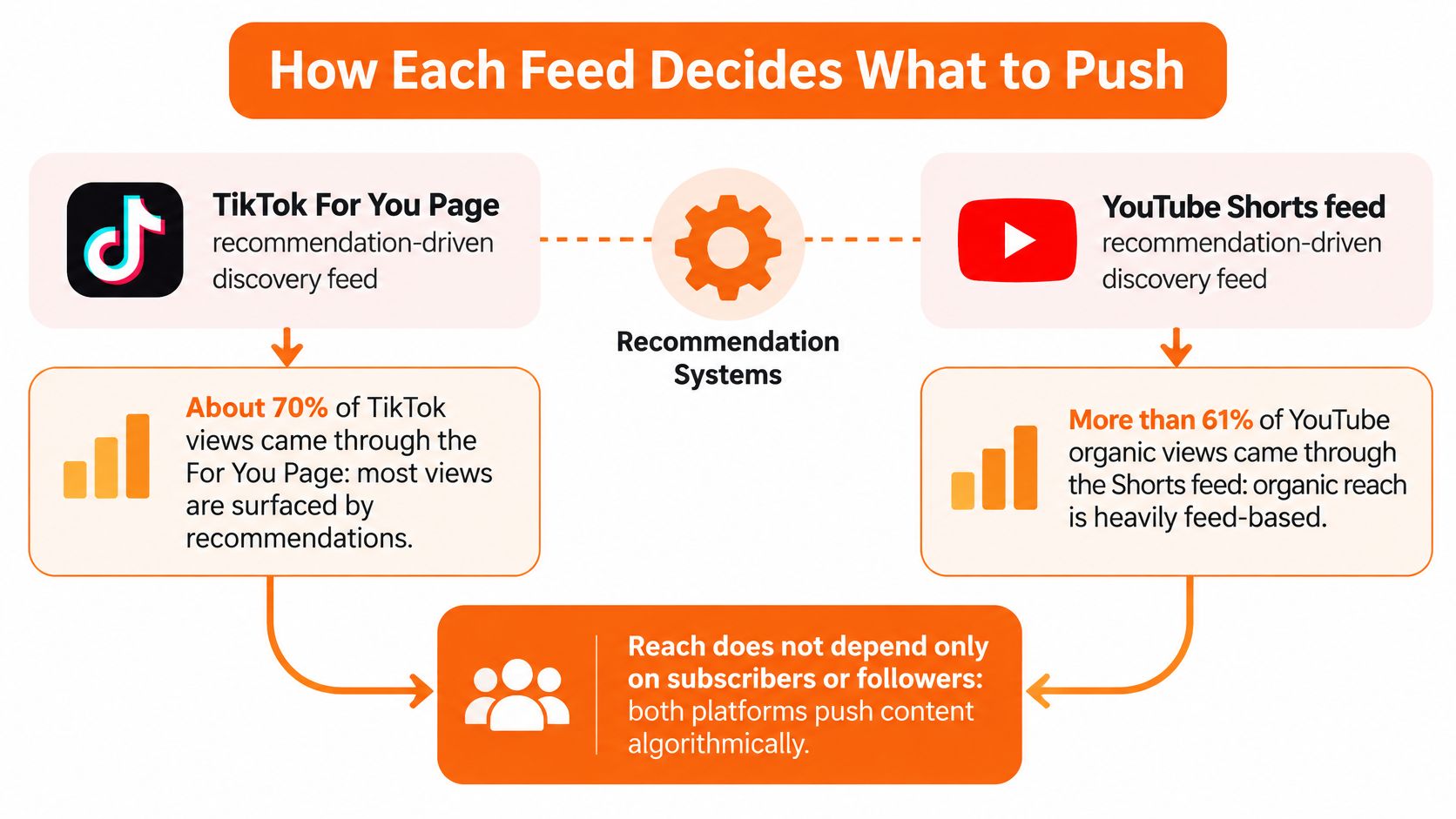
Both platforms rely heavily on recommendations, not only on a creator’s existing follower base. One benchmark summary reports that roughly 70% of TikTok views came through the For You Page, while more than 61% of YouTube organic views came through the Shorts feed, according to organic reach benchmark figures. These figures suggest that each platform can surface clips to people who don’t already follow the account. They don’t mean the two recommendation systems work identically, so treat each feed as a separate testing environment.
The opening frame and the first seconds shape whether a viewer understands the clip before swiping away. Once the opening earns attention, average percentage viewed and rewatches help describe whether people stayed with the clip or watched it again. Shares and comments add other evidence about how viewers responded. Don’t assume one signal alone explains distribution; use a group of measures to diagnose what happened.
The denominator matters when you compare engagement rates. TikTok engagement is often expressed relative to followers, while YouTube performance is commonly examined through views, subscribers, and watch time. A percentage calculated against followers shouldn’t be compared directly with one calculated against views.
| Platform | Primary metrics | Secondary metrics | Denominator |
|---|---|---|---|
| YouTube Shorts | View-through rate, average percentage viewed | Rewatches, shares, comments, follows or subscribers, clicks to long-form | Views, subscribers, and watch time |
| TikTok | Comments, shares, follows | Rewatches, average percentage viewed | Followers |
Track the metrics separately, then use each platform’s own analytics to decide what to change. A Short that gets views but few clicks to a longer video may be doing its discovery job without moving viewers further into the channel. A TikTok that draws comments may be creating conversation even if it doesn’t lead to the same downstream action. If viewers don’t understand the opening quickly, the clip has little chance to earn any of those signals.
What Each Platform Pays Creators
The rate card is the smallest part of the payout decision. For the same source clip, Shorts and Creator Rewards reward different versions of success: Shorts can pay on brief discoveries that feed a channel, while Creator Rewards pays better only when the clip clears stricter eligibility and length conditions.
| Requirement | YouTube Shorts | TikTok Creator Rewards |
|---|---|---|
| Follower or subscriber threshold | YouTube Partner Program eligibility rules apply | At least 10,000 followers |
| Eligible clip length | Sub-minute Shorts can count toward Shorts revenue sharing | Videos must be longer than one minute |
| Payout per 1,000 qualified views | About $0.01 to $0.33 | About $0.40 to $2.00 |
| Route beyond direct payout | Long-form videos, memberships, and other YouTube products | Direct engagement, trends, and commerce |
The industry estimates in the TikTok Rewards and Shorts monetization comparison put Shorts at about $0.01 to $0.33 and Creator Rewards at about $0.40 to $2.00 per 1,000 qualified views, with TikTok also requiring at least 10,000 followers, 100,000 views in 30 days and videos longer than one minute. Treat those ranges as estimates, not guaranteed rates.
That changes the verdict by catalog. A streamer clipping fifteen-second highlights may find many uploads ineligible for Creator Rewards even when viewers respond. A creator already publishing minute-plus commentary, tutorials or story cuts is closer to TikTok’s rules and can justify testing the higher estimated payout.
The larger difference is what a view can become. A Short can route attention into long-form watch time, memberships and other YouTube revenue. A TikTok can pay more directly and also open commerce, trend participation and audience interaction. Identical cross-posting hides that trade-off because it measures the same upload while ignoring which downstream action each feed is built to reward.
Use one test: total revenue per editing hour after eligibility, clip length, long-form clicks, sponsorship value and commerce potential. The platform with the lower estimated rate can still win if it moves viewers into a larger revenue system.
Video Specs for Each Platform
Start with one 9:16 vertical master and keep the main subject and action near the centre of the frame. That makes it easier to preserve the moment when you adapt the clip for different feeds, especially when the source recording was horizontal. Before exporting, check that the crop keeps faces, gameplay, and other essential visual details in view.
The maximum length differs: YouTube Shorts accepts videos up to 3 minutes, while TikTok accepts videos up to 10 minutes. Length should follow the clip’s purpose, not just the platform limit. If you’re targeting TikTok Creator Rewards, the video must be longer than a minute to meet its stated length rule. On Shorts, sub-minute views can count toward revenue sharing. The guide to choosing a YouTube Short’s length offers a useful format reference.
Exporting a vertical clip in 2K gives you a file ready for both platforms. Keep captions clear of buttons and interface elements near the screen edges, and make sure they remain easy to read on a phone. Mix the voice above background music so viewers can follow the clip without turning the volume up.
Use the same clean master for both uploads, then adjust the packaging rather than changing the aspect ratio or rebuilding the edit from scratch. Platform rules can change, so check each service’s current upload guidance before launching a campaign. That’s especially useful when a campaign depends on a particular length limit or monetization rule.
Repurposing One Clip for Both Platforms
A single source recording can produce two purposeful versions without changing the core moment. Use this workflow:
- Select the moment: Export the strongest section from one 9:16 master.
- Cut for TikTok: Use a faster cold open and consider a trend-aware sound that fits the clip.
- Cut for Shorts: Add clearer context and wording that helps identify the topic.
- Adjust the captions and ending: Change caption density and the prompt to suit the platform.
- Publish and log both versions: Record which edit went to each feed.
- Compare after 14 days: Review view-through rate, average percentage viewed, follows, and clicks to long-form content.
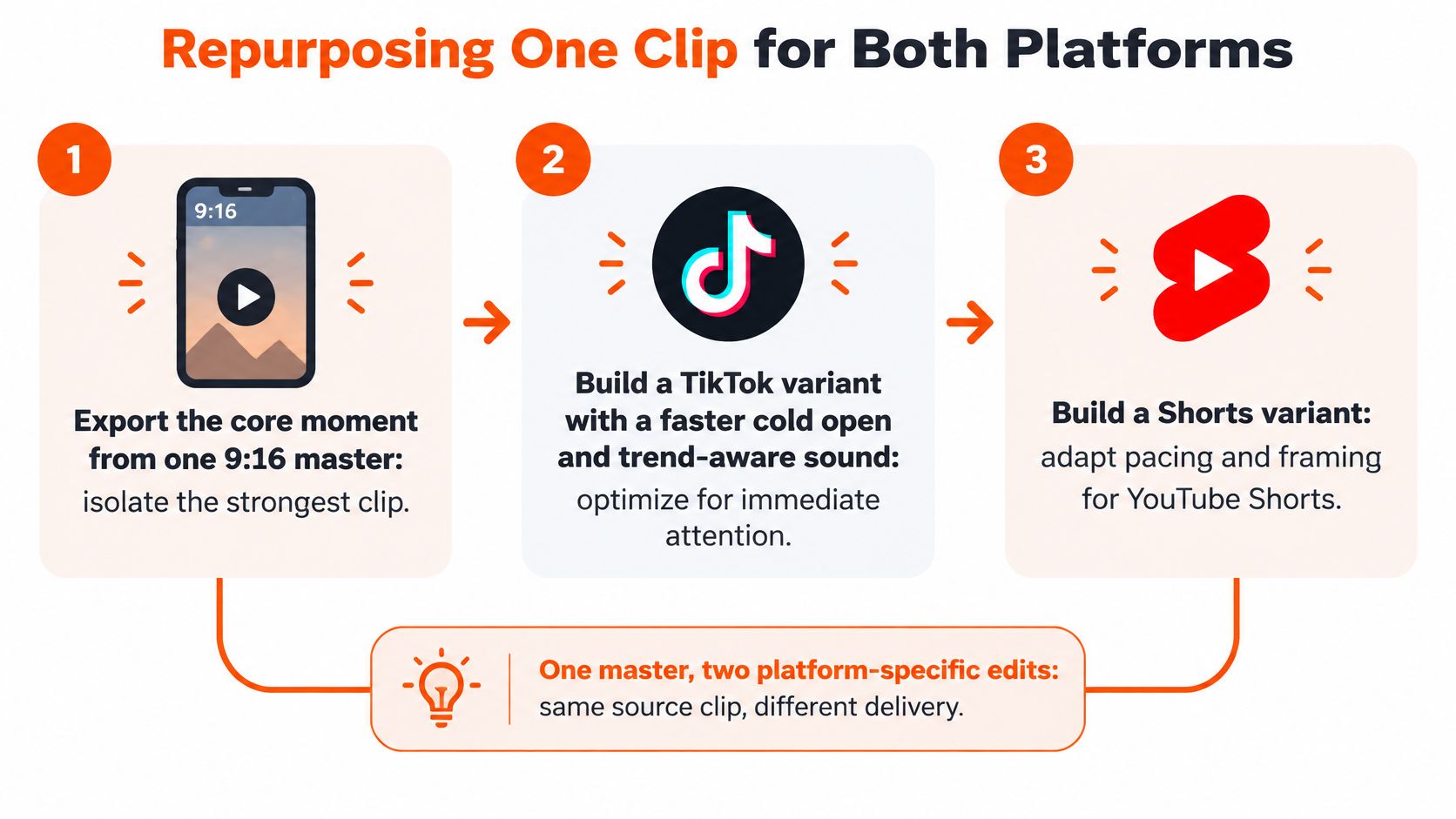
The same-file approach can hide the actual trade-off. TikTok engagement is often judged against followers, while YouTube performance is more naturally evaluated through views, subscribers, watch time, and movement into long-form videos. An automated crop can keep a subject in frame, but it can’t decide whether the opening needs a trend-led hook or more explanation. A cross-platform creator monetization comparison describes this packaging challenge: the same source may need faster trend-aware framing for TikTok and clearer context or a route to a full video for Shorts.
| Element | TikTok version | Shorts version |
|---|---|---|
| Opening hook | Cold open in the first second with trend-aware sound | Give context in the first two to three seconds, including the game or topic |
| Caption density | Dense, fast captions that match the beat | Readable captions with searchable keywords |
| Clip length | Shorter cut with a fast payoff | Longer cut if the idea needs it, with sub-minute edits also possible |
| Title or on-screen text | Trend phrase | Searchable title with the game or topic name |
| Ending prompt | Invite a comment or duet | Route viewers to a full YouTube video or invite them to subscribe |
Take a gaming highlight: the TikTok cut might begin at the surprising moment and use a sound that fits the trend. The Shorts cut might name the game and explain the setup before the payoff, then point interested viewers toward the full recording. The footage stays the same, but the context and invitation change.
ClipOven can help prepare these variants from horizontal footage. Eddie converts it to a subject-focused 9:16 clip with captions suited to the feed, and final vertical clips can be exported in 2K for TikTok and Shorts. After Eddie edits a clip, you can keep refining it in chat or open the full editor to adjust cuts, timing, captions, and effects. For a broader workflow, see the guide to repurposing video content. Keep the core moment; change the packaging.
Which Platform Fits Your Situation
Gaming streamers with long-session highlights. Start with Shorts if a highlight can lead viewers to a full stream recording or other YouTube videos. The signal that would change the recommendation is stronger TikTok performance on the outcome you want, such as relevant follows or meaningful discussion.
Trend-led creators making sub-minute clips. TikTok is usually the more natural first choice when speed, trend participation, and direct engagement matter most. But a sub-minute edit won’t meet TikTok Creator Rewards’ stated video-length condition, and creators below its follower threshold aren’t yet eligible. If your clips can be extended without weakening the payoff and you meet the program’s requirements, the revenue calculation may change.
Brands and publishers with a long-form library. Use Shorts as a route into owned YouTube videos when the campaign needs viewers to explore more than one clip. TikTok may lead for a focused campaign tied to a trend or direct audience interaction. If TikTok sends more of the audience you need toward a measurable next step, that’s a reason to shift the lead platform.
Freelancers and clippers handling multiple clients. Choose platform by client goal and eligibility, not by habit. A gaming client seeking long-form viewers and a creator chasing trend-led conversation need different edits, even when the source footage is similar. Reverse the choice when the client’s measured outcome changes, not just because one post draws more raw views.
Creators without a channel yet. Begin where the intended audience is already active and where you can sustain the editing and publishing routine. If early results show that viewers want more context or follow-up content, prioritize the platform that lets you build that next step. The right initial choice is a testable starting point, not a permanent commitment.
Run a Two-Platform Test Before You Commit
A controlled test can tell you more than an audience-size headline. Keep the source recording consistent, change the platform packaging, and choose the outcome you’ll use to make the decision.
- Choose the source: Select one recording and cut two or three clips from it.
- Make native variants: Apply the platform-specific edits, including the opening, captions, and ending prompt.
- Publish on the same day: Post one version to each platform so the test uses a shared starting point.
- Wait 14 days: Track each platform’s metrics separately, using the measures that fit your goal.
- Make the call: Keep the platform that leads on your chosen metric by a clear margin, or keep both if each serves a different goal.
Don’t combine unlike numbers into one score. If awareness is the goal, focus on reach and views using each platform’s definition. If you want community, examine relevant comments, shares, and follows. If the aim is long-form growth, track clicks and the subscribers or followers gained from the clip. A platform that leads on one outcome may not lead on another, and that can justify keeping both versions in the rotation.
ClipOven’s workflow starts with your footage and a description of what you want Eddie to create. Eddie turns the raw clip into a vertical short, which you can refine in chat or adjust in the full editor. ClipOven is not affiliated with or endorsed by YouTube or TikTok.
Pick the platform by the goal you measure, not by the headline audience number.
Bring a horizontal recording to clipoven and use Eddie to turn it into a vertical short with subject-focused reframing, captions, and editable cuts. Create platform-specific versions of the same source clip, then compare which one serves your goal.